
You're Running a Business, Not a Content Studio
Here's a scenario I hear constantly: you own a local business, you know you need to post on social media, and you're either not doing it at all or you're staying up until 11pm trying to write captions for Instagram while also answering emails and preparing for tomorrow.
Social media is supposed to help you get customers. Instead it's eating your evenings. The problem isn't discipline — it's that managing multiple platforms, writing content, figuring out when to post, and actually tracking what works is genuinely a part-time job. And you already have one of those.
That's the gap Metricool is designed to fill. It's an AI social media tool built for exactly this situation — small business owners who need their social presence handled without hiring a full marketing team or spending 10 hours a week on it themselves.
What Is Metricool and What Does It Cost?
Metricool is an all-in-one social media management platform launched by a Spanish startup in 2016. It now has over 1 million users worldwide. The platform lets you schedule posts, generate AI-written content, analyze your performance, and track competitors — all from one dashboard.
Here's what it'll actually cost you:
- Free plan: 1 brand, limited posts per month, basic analytics — good for testing it out
- Starter ($18/month): 1 brand, unlimited scheduling, AI content assistant, best-time-to-post recommendations
- Advanced ($45/month): Multiple brands, competitor analysis, more detailed analytics, team collaboration
For a solo business owner, the $18/month Starter plan is usually plenty. That's less than two cups of coffee a week to stop manually managing your social accounts.
What It Actually Does — No Jargon
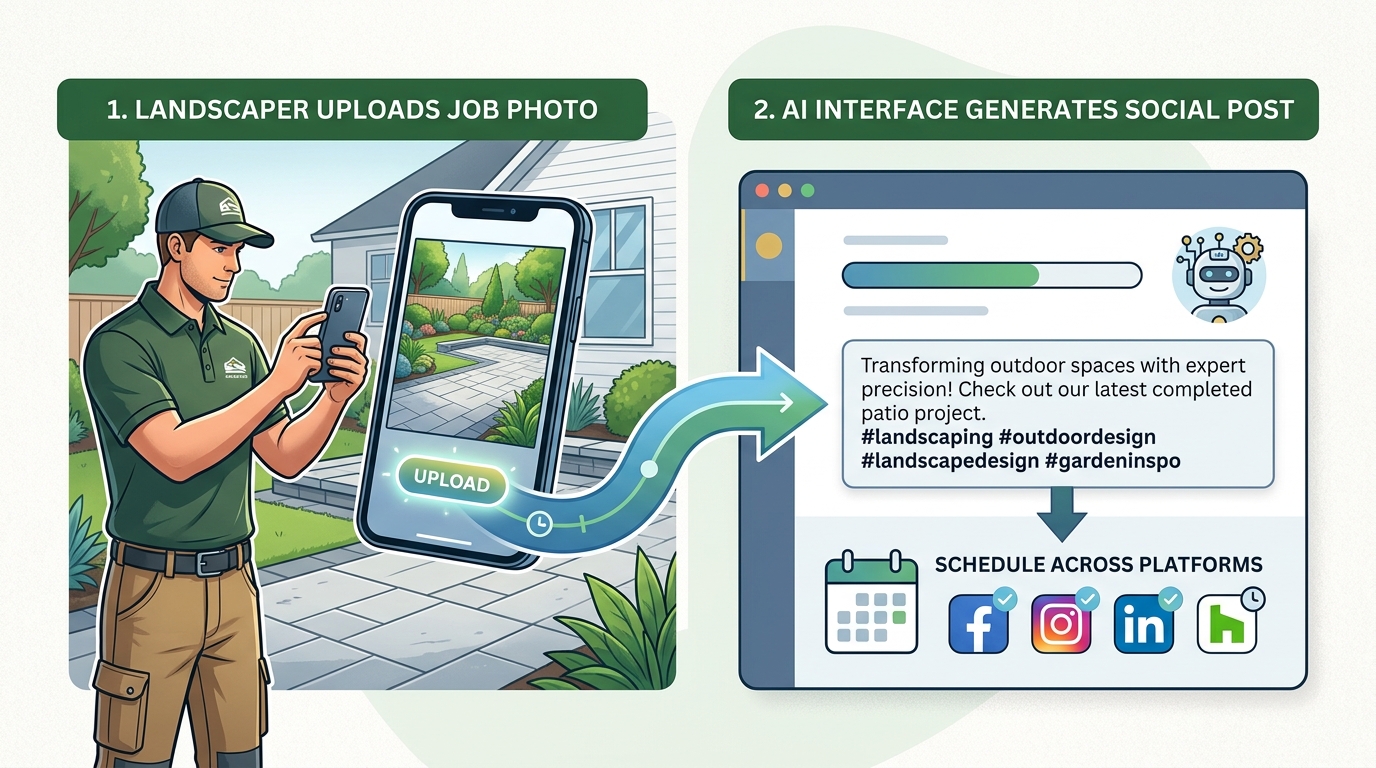
Let's break down the features that matter for a small business:
AI Content Assistant: You tell Metricool what you want to post about — a new menu item, a sale, a before-and-after project photo — and it drafts the caption for you. You can tweak it or use it as-is. It can also suggest relevant hashtags automatically.
Best Time to Post: Metricool looks at your audience's activity and tells you specifically when to publish on each platform so more people actually see your content. No more guessing whether Tuesday at noon beats Thursday at 7pm.
Unified Scheduling Calendar: You log in once and schedule posts across Instagram, Facebook, LinkedIn, TikTok, X (Twitter), Pinterest, YouTube, and Google Business Profile all at once. One post, eight platforms, done.
Analytics Dashboard: It tracks which posts get the most engagement, how your follower count is moving, and what content your audience responds to. You see real numbers, not just vanity metrics.
Competitor Tracker: On the Advanced plan, you can watch what competitors are posting and how their content performs. Useful if you're in a crowded local market.
A Real Example: How a Landscaping Company Would Use This
Let's say you run a landscaping business — three crews, residential and commercial clients, and you've been meaning to post on Instagram and Facebook for months but it never happens.
Here's what your Monday morning looks like with Metricool:
You open the app, upload four photos your crew took on a big job last week — a nice patio install with new sod. You click "Generate Caption," describe the job briefly, and Metricool drafts something like: "From bare dirt to the backyard of your dreams. This Glen Mills homeowner wanted low-maintenance and got exactly that. Spring installs are booking fast — link in bio."
You adjust one word, pick the best three photos, and use the scheduling calendar to post Monday on Instagram, Wednesday on Facebook, and Friday on Google Business Profile. The tool tells you 6:30pm is when your audience is most active, so it schedules all three automatically.
That whole process just took you 12 minutes. You didn't write a caption from scratch, you didn't have to remember to log into three separate apps, and you didn't have to guess when to post. Next week you do the same thing. Within a month you've got a consistent social presence — which is the single biggest factor in whether social media actually generates leads for local businesses.
Pros
- Genuinely saves time: The AI drafting plus bulk scheduling is legitimately useful, not just a gimmick. Most users report cutting their social media time by 60–70%.
- Works across all the major platforms: Instagram, Facebook, TikTok, Google Business Profile, LinkedIn — you're covered without juggling five different apps.
- Analytics you can actually act on: The performance data is clear and tied to specific posts, so you can see "oh, before-and-after photos do 3x better than product shots" and adjust accordingly.
Cons
- AI captions need editing: The AI output is a solid starting point, not a finished product. If you post it word-for-word without reading it, it'll sound generic. Budget 2–3 minutes to personalize each one.
- Free plan is limited: The free tier is good for testing but not really viable for running an actual business's social media. You'll want to budget for at least the $18/month Starter plan.
- Learning curve on analytics: The dashboard has a lot of data. For someone who's never looked at social analytics before, the first week can feel overwhelming. It settles down once you know what to focus on.
How It Compares to Buffer and Hootsuite
Buffer is the other big name in this space. It's simpler and slightly cheaper at the entry level ($6/month per channel), but the AI features are less developed than Metricool's and the analytics are more basic. If you just need scheduling and nothing else, Buffer is fine. If you want AI drafting, competitor tracking, and real analytics in one place, Metricool wins.
Hootsuite is the enterprise option — it starts at $99/month and is built for marketing teams, not solo business owners. Unless you're managing social media for 10+ brands, it's overkill and overpriced.
For most small businesses running 1–2 brands, Metricool hits the sweet spot between features and price.
One More Thing Worth Knowing
Tools like Metricool handle scheduling and drafting well, but they're not magic. You still need to provide the raw material — photos of your work, updates about your business, genuine moments from your day-to-day. The AI helps you package that content efficiently. What it can't do is invent the story of your business for you.
If you want to go deeper — like connecting your social automation to your CRM, building a workflow that auto-posts when you complete a job, or syncing leads from Instagram DMs into a sales pipeline — that's where custom automation comes in. I've built those kinds of systems for clients starting around $1,000. You can also check out the marketing suite at links.autom84you.com, which handles QR tracking, short links, and campaign analytics alongside your social work.
Start Here: Your Next Step Today
Go to metricool.com and sign up for the free plan. Connect your Instagram and Facebook accounts. Look at the analytics tab and see what your last 30 days of posts actually did — most people are surprised. Then try drafting one post with the AI assistant and scheduling it for later this week.
That's it. You don't need to overhaul anything. Just do one post, see how the tool feels, and decide from there whether $18/month is worth it for your situation. For most small business owners, the math works out pretty quickly.
If you'd rather skip the setup entirely and just have someone build you a full social automation system that runs on autopilot, that's literally what I do. Check out autom84you.com or shoot me an email at nerd@autom84you.com and we'll figure out what makes sense for your business.




Comments
No comments yet. Be the first to share your thoughts!
Leave a Comment