
A plumber in Stockton showed me his landing page last month. Looked great - clean logo, nice stock photo of a wrench, a paragraph about how his company has been 'serving the community since 2011.' He was paying $150/month for it through one of those website-in-a-box services. He'd gotten maybe three leads from it in six months.
I rebuilt it in a weekend. Same guy, same plumbing business, same zip codes. Within 30 days he'd gotten 22 form submissions and 14 phone calls. The page wasn't prettier. It was just built around one idea most small business owners skip: every single element on the page exists to get the visitor to do one thing.
That's what this guide is about. Not design theory. Not marketing fluff. Just the steps to build a landing page that actually produces results - whether you're a house cleaner in Modesto, a wedding photographer in Sacramento, or an HVAC company in Fresno.
What You Need Before You Start
Keep this simple. You need:
- A clear service you want to promote (not your whole business - one service)
- A way to build a webpage. Could be WordPress, Squarespace, Carrd ($19/year), or even raw HTML if you're handy
- About 3-5 real photos of your work, your team, or your location. Phone photos are fine. Stock photos are not.
- 30-60 minutes of uninterrupted focus
That's it. No fancy tools. No $200/month software. Let's go.
Step 1: Pick One Offer and One Audience
This is where most pages die before they start. A landing page is not your homepage. It's not a menu of everything you do. It's a page built around one specific offer for one specific type of customer.
Bad example: 'We offer residential and commercial HVAC installation, repair, maintenance, and duct cleaning across the Greater Sacramento area.'
Good example: 'AC not cooling your house? We'll diagnose it today - $49 service call, applied to any repair.'
The first one describes a business. The second one solves a problem. Your landing page should solve a problem.
Step 2: Write a Headline That Passes the Five-Second Test
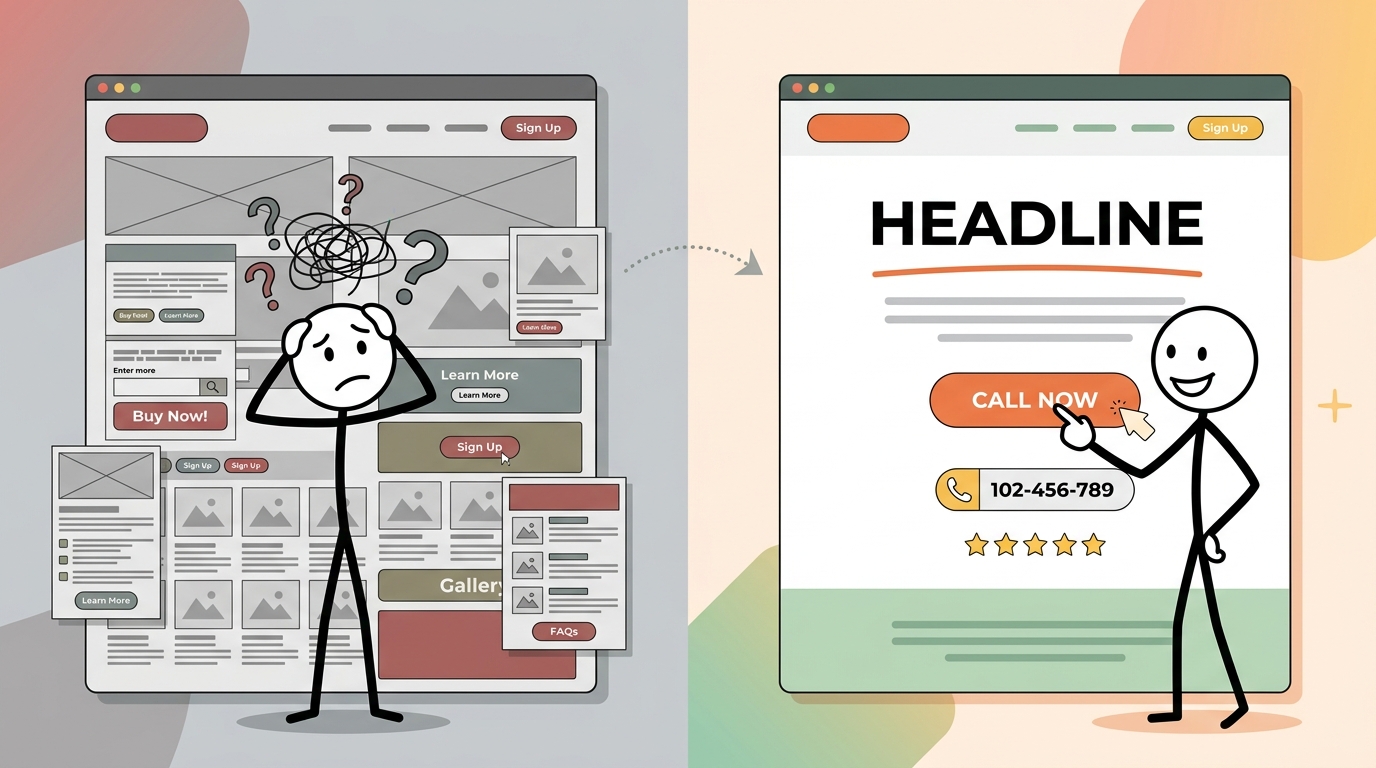
When someone lands on your page, they decide in about five seconds whether to stay or bounce. Your headline has to answer one question instantly: 'Am I in the right place?'
Here's the formula that works for local service businesses: [Outcome the customer wants] + [Location or specificity] + [Reason to trust you]
Examples:
- 'Deep Cleaning for Elk Grove Homes - 500+ Five-Star Reviews'
- 'Wedding Photography in Napa Valley - Packages Starting at $1,800'
- 'Same-Day Garage Door Repair in Manteca - Licensed & Insured Since 2009'
Notice: no clever wordplay, no puns, no 'Welcome to our website.' Just clarity.
Step 3: Put Your Call-to-Action Above the Fold
'Above the fold' means the part of the page visible without scrolling. This is where your primary call-to-action (CTA) goes. Not buried at the bottom. Not hidden in the navigation. Right there, impossible to miss.
For most local businesses, the best CTA is one of these:
- A phone number that's tap-to-call on mobile (this matters - over 60% of your visitors are on phones)
- A short form: name, phone, what they need. Three fields max.
- A 'Book Now' button linked to your scheduling tool
Common mistake: Having two or three competing CTAs. 'Call us! Also email us! Also fill out this form! Also follow us on Instagram!' Pick one primary action. Everything else is secondary.
Step 4: Add Three to Five Trust Signals
Your visitor doesn't know you. They Googled something, clicked a result or an ad, and now they're on your page. They're skeptical. They should be - they've probably been burned by a contractor who ghosted them or a service that overpromised.
Trust signals fix this. Use at least three:
- Google review count and rating. '4.8 stars from 127 reviews' hits harder than 'highly rated.'
- Real photos. Your truck. Your team. A before/after of your work. Not stock photos of smiling people in headsets.
- Specifics about your business. 'Family-owned since 2015. 3,200+ jobs completed in San Joaquin County.' Numbers are more believable than adjectives.
- Badges or affiliations. Licensed, bonded, insured. BBB. Yelp Guaranteed. Whatever applies to your trade.
- One or two short testimonials. Real name, real city. 'They fixed our furnace the same day we called. - Maria R., Tracy, CA' beats a paragraph-long anonymous review.
Step 5: Describe the Outcome, Not the Process
This is the body of your page, and it's where most business owners go wrong. They write about themselves. Their history, their certifications, their equipment, their 'passion for excellence.'
Your customer doesn't care about any of that. They care about what happens after they hire you.
Instead of: 'Our technicians undergo 40 hours of annual training and use state-of-the-art diagnostic equipment.'
Write: 'You'll know exactly what's wrong with your AC before we start any work - and exactly what it'll cost. No surprises on the bill.'
Frame everything around the customer's experience. What will they feel? What problem goes away? What do they not have to worry about anymore?
Step 6: Handle the Top Three Objections
Think about why someone would look at your page and not contact you. There are usually three reasons, and they're predictable:
- 'How much does it cost?' - Give a range or a starting price. 'Kitchen deep cleans start at $180' is better than 'Contact us for a quote.' People don't want to call just to find out if they can afford you.
- 'Can I trust these people?' - That's what your trust signals handle (Step 4).
- 'Is this going to be a hassle?' - Explain how simple the process is. 'Book online, we show up on time, you pay when the job's done.' Three steps. Easy.
A FAQ section works great here. Three to five questions, short answers. Don't overthink it - just answer the stuff people actually ask you on the phone.
Step 7: Make It Fast and Mobile-First
If your landing page takes more than three seconds to load on a phone, you're losing roughly half your visitors before they see a single word. That's not an exaggeration - Google's own data backs this up.
Quick wins:
- Compress your images. Use TinyPNG or Squoosh (both free) to shrink file sizes by 60-80% with no visible quality loss.
- Skip the giant hero video. A well-chosen photo loads 10x faster.
- Test your page on your own phone. If you have to pinch-to-zoom to read anything, it's broken.
- Run it through Google PageSpeed Insights (free). Aim for a mobile score above 80.
I've seen businesses spending $500/month on Google Ads sending traffic to a page that scores 35 on mobile. That's burning money.
Step 8: Set Up Tracking So You Know What's Working
This step gets skipped constantly, and it's the reason so many business owners say 'I tried online marketing and it didn't work.' They had no way to know if it was working or not.
At minimum, set up:
- Google Analytics 4 (free) - tells you how many people visit, where they came from, how long they stayed
- A form submission notification - most form builders email you when someone submits. Make sure this is turned on and going to an inbox you check.
- Call tracking - Google Ads has built-in call tracking. If you're not running ads, a service like CallRail ($45/month) or even just a dedicated Google Voice number works.
If you want to get more granular - tracking which specific links, QR codes, or social posts drive traffic - tools like Autom84You's marketing suite let you tag every link and see exactly which channels are producing actual leads, not just clicks.
What to Do Next
Once your page is live, send it some traffic and watch what happens. Share it on your Google Business profile. Run a small Google Ads campaign - even $10/day for two weeks will give you enough data to see if the page is converting. Post the link on your social media with a specific offer attached.
Then look at the numbers after two weeks. If you're getting traffic but no conversions, the page needs work - probably your headline or your CTA. If you're getting conversions, scale up the traffic.
And if you read through all eight steps and thought 'this is solid but I'm not going to do it myself' - fair enough. That's a completely rational response. I build these pages for local businesses regularly, usually for around $500, and they tend to pay for themselves within the first month or two. You can see examples at autom84you.com/pages/portfolio.php.
Or just shoot me a note at nerd@a84y.com and tell me what your business does. I'll be straight with you about whether a landing page is even the right move - sometimes it's not, and I'd rather tell you that upfront than sell you something you don't need.


Comments
No comments yet. Be the first to share your thoughts!
Leave a Comment