
The $12,000 Quote That Started Everything
A nail salon owner on El Camino Real in Sunnyvale showed me her phone last month. A Bay Area agency had quoted her $12,000 for a website. Five pages. No e-commerce. No booking system. Just a menu of services, some photos, and a contact form.
She'd already tried building one herself on Wix. It looked like 2014. Her daughter suggested Squarespace. It looked better but still felt generic. Then someone mentioned Framer - and that's when she started Googling "web developer Sunnyvale" to figure out whether she even needed one anymore.
Fair question. Let me give you a fair answer.
What Framer Actually Is
Framer is a website builder made by a Dutch company called Framer BV, founded in 2013. It started as a prototyping tool for designers and pivoted hard into being a full website platform around 2022. It's not Squarespace. It's not WordPress. It's closer to Figma-meets-website-hosting.
Pricing: Free tier with a framer.com subdomain. Mini plan at $5/month for a custom domain. Basic at $15/month. Pro at $30/month. All billed annually - monthly pricing runs higher.
The free tier is genuinely usable for testing. That alone puts it ahead of most competitors.
What It Does in Plain Language
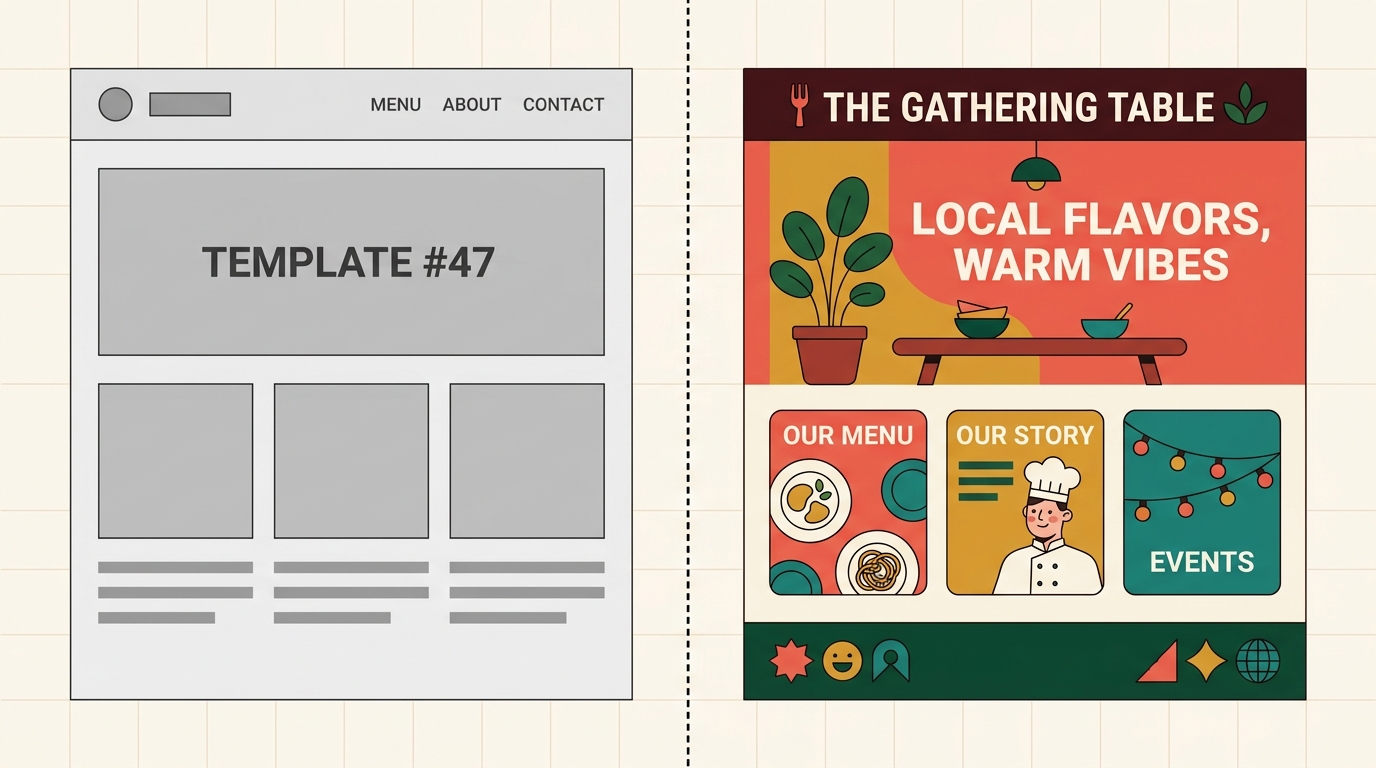
You pick a template or start blank. You drag elements around a canvas - text blocks, images, buttons, sections. It feels like editing a PowerPoint slide, except the result is an actual live website.
The AI features are the real draw in 2026. You can describe what you want ("a pricing table with three tiers, dark background, rounded corners") and Framer generates it. Not perfectly every time, but well enough that you're editing instead of building from scratch.
It handles hosting, SSL certificates, and basic SEO settings automatically. You don't need to think about servers. You don't need to call your nephew who "knows computers."
A Pho Restaurant on Murphy Avenue: How This Works Day-to-Day
Let's say you run a pho restaurant in downtown Sunnyvale. Here's what using Framer looks like:
Day 1: You pick a restaurant template. Swap in your photos (you have decent iPhone shots from last week's special). Update the menu. Add your address and hours. Connect your domain. You have a live website by dinner service.
Week 2: You realize you want online ordering. Framer doesn't have built-in e-commerce for restaurants. You embed a Toast or Square Online widget. It works, but the styling doesn't quite match. The fonts are off. The button colors clash.
Month 2: Google reviews mention your site looks "clean" but you notice your competitor down the street - the one who hired a web developer in Sunnyvale - has a site that loads faster, shows up higher in local search, and has a custom ordering flow that actually matches their brand.
This is the pattern I see constantly.
Three Things Framer Does Well
1. Speed to launch. If you need a site live this week and you're not doing anything complex, Framer gets you there faster than anything except maybe Carrd (which is even more limited).
2. Design flexibility. Unlike Squarespace's rigid grid system, Framer lets you place things wherever you want. Designers love it. Non-designers can still use templates and stay safe.
3. The free tier is real. You can build and publish a complete site without entering a credit card. Try that with Webflow.
Three Things That'll Frustrate You
1. CMS limitations. If you need a blog with more than basic functionality, or a product catalog with filtering and search, Framer's content management system feels thin. It's improving quarterly, but it's not WordPress-level and probably never will be.
2. No backend logic. Need a customer portal? Appointment booking with custom rules? Dynamic pricing? Framer can't do it. You'll need to embed third-party tools for everything beyond static content, and each embed is another monthly subscription adding up.
3. SEO ceiling. The basics are there - meta titles, descriptions, clean URLs. But structured data, advanced schema markup, programmatic SEO for multiple service pages targeting different Sunnyvale neighborhoods? You'll hit walls. And in a market this competitive, those walls cost you real money.
How Framer Stacks Up Against the Competition
Framer vs. Squarespace ($16-49/month): Squarespace has better e-commerce and blogging. Framer has better design freedom and is cheaper at the low end. For a service business that just needs to look good and rank locally, Framer wins. For anyone selling products online, Squarespace wins.
Framer vs. Webflow ($14-39/month): Webflow is more powerful but has a brutal learning curve. If you're not a designer or developer, Webflow will eat your weekends alive. Framer is the friendlier option. Webflow is what a web developer in Sunnyvale would use when building a custom site for a client - it's a professional tool wearing a consumer costume.
When You Actually Need a Web Developer in Sunnyvale
Here's where I stop being neutral, because this is literally what I do for a living.
Framer is great for getting started. But Sunnyvale is booming - according to The San Francisco Standard, the city has become tech's ultimate industry town, and local businesses are competing for attention against companies with actual marketing departments. A template website in this market is a participation trophy.
I've built sites for HVAC contractors, dental offices, and tutoring services around the South Bay as a Sunnyvale web developer. The difference between a $16/month Framer site and a custom-built site isn't just aesthetics - it's whether your site shows up when someone searches "emergency plumber Sunnyvale" at 2 AM, whether your booking flow actually reduces no-shows, whether your site converts visitors into calls instead of bounces.
Custom sites at Autom84You start at $500. Not $12,000. Not $5,000. Five hundred dollars for a site built specifically for your business, your neighborhood, your customers. I also build AI chatbots trained on your actual services and FAQs - starting at $1,000 - so your website answers customer questions at midnight without you losing sleep.
The Real Question
It's not "Framer or a web developer?" It's "what does my business actually need right now?"
If you're a freelance photographer who needs a portfolio online by Friday, use Framer. Seriously. It'll look great and cost you nothing.
If you're a Sunnyvale business trying to win local customers away from your competitors - the ones already paying for Google Ads and proper SEO - a website builder alone won't close that gap. You need someone who understands how local search works in the South Bay, how to structure a site for conversions, and how to make the whole thing feel like YOUR business instead of Template #47 with your logo swapped in.
That's what a web developer in Sunnyvale is actually for. Not building pages - building the thing that makes your phone ring.
If you want to talk about what your site specifically needs - no pitch, just an honest look - hit me at nerd@a84y.com. I'll tell you if Framer is genuinely enough for your situation. Sometimes it is. And when it's not, I'll show you what the alternative looks like at autom84you.com.

Comments
No comments yet. Be the first to share your thoughts!
Leave a Comment