
Most Cafes Overpay for a Website That Does Three Things
Here's what happens every time a cafe opens: the owner Googles "how to make a website for my cafe," ends up on Squarespace or Wix, picks a template, and starts paying $16 to $33 a month. That's $192 to $396 a year for a website where 90% of visitors do exactly three things - check the menu, check the hours, and tap the address for directions.
The cafe website essentials that actually matter fit on a single page. And there's a tool that builds that single page for $19 a year. Not $19 a month. $19 a year.
What Cafe Website Essentials Actually Look Like
QSR Magazine published a breakdown of the essential elements every restaurant website needs, and most of them come down to five things: a current menu with prices, today's hours (including holiday closures), your address with a map link, a phone number, and a way to order online if you offer that.
That's it. Not a blog. Not an "our story" page with a timeline of your latte art journey. Not a gallery with 47 photos of your pastry case. Those are nice-to-haves. They are not why someone is on your website at 7:14 AM trying to figure out if you're open yet.
The cafe website essentials that drive foot traffic are informational, not aspirational. People want answers fast, on their phone, usually while walking.
The Popular Path: Squarespace
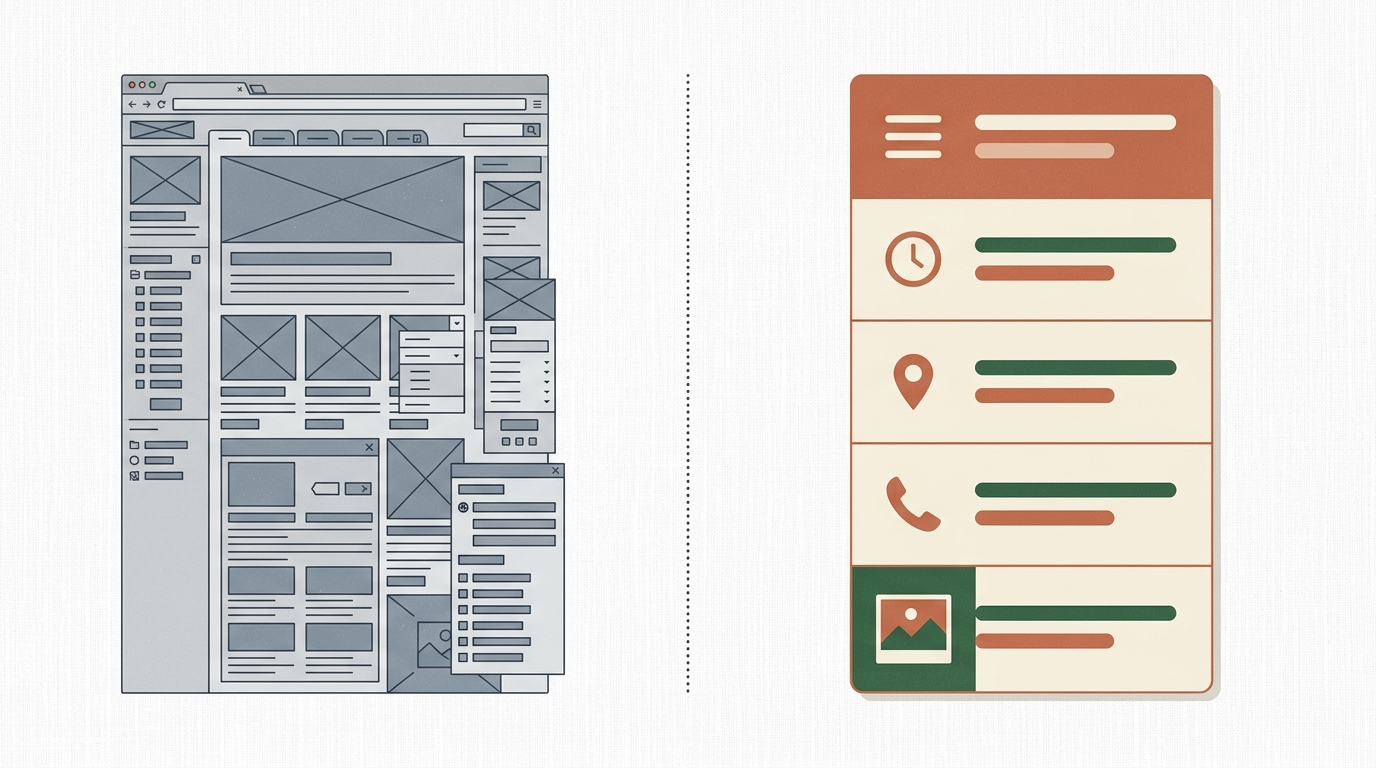
If your cafe runs a subscription coffee service, sells bags of beans online, and hosts ticketed events, Squarespace earns its price. It handles complex operations well.
But if your website's job is to show people your menu, your hours, and your address - and that describes most neighborhood cafes - you're renting a three-bedroom house to store a bicycle.
The Quieter Option: Carrd
Carrd is a one-page website builder made by a solo developer named AJ. It does exactly one thing: builds fast, responsive, single-page sites. The free tier gets you started. Pro Standard - the tier that gives you a custom domain, contact forms, and embedded widgets - costs $19 per year.
For cafe website essentials, that's the entire feature set you need. One page. Menu at the top, hours in the middle, a Google Maps embed and phone number at the bottom. Maybe a contact form for catering inquiries. Done. The site loads in under a second on mobile because there's almost nothing to load.
There's no CMS, no blog engine, no e-commerce layer, no app marketplace. That's the point. You're not paying for features you'll never open.
A Day in the Life: Roast Republic, a Coffee Shop in Oakland
Imagine a single-location specialty coffee shop - let's call it Roast Republic. Three employees, no online ordering, changes its menu seasonally. The owner, Maya, was paying $27/month for Squarespace. Her site had five pages: Home, Menu, About, Gallery, Contact. Google Analytics showed that 83% of visits hit the homepage and left. Most visitors came from Google Maps, tapped through to check hours or the menu, then put their phone away and walked in.
Maya moved everything to a Carrd page. The entire cafe website - essentials only - took two hours to build. Menu with prices, hours including holiday closures, the address linked to Google Maps, her Instagram feed embedded at the bottom, and a contact form. Total annual cost went from $324 to $19.
When the seasonal menu changes, she logs into Carrd, edits the menu section (plain text, no content blocks to wrestle with), hits publish. Three minutes. When she moved to winter hours, same thing. The site does less, and that's exactly why it works better for her.
Honest Pros and Cons
Carrd - What's Good
Price is hard to argue with. $19/year versus $192 - 396/year for Squarespace or Wix. For a cafe that doesn't sell online, the savings are real.
Speed, both yours and the site's. You can build a complete cafe page in an afternoon. The finished site loads faster than any template-based platform because there's so little to render.
Maintenance is almost zero. One page means one thing to keep updated. No plugins to patch, no themes to update, no "your SSL certificate needs renewal" emails.
Carrd - What's Not
No built-in online ordering. If you need direct ordering (not through DoorDash or Toast), Carrd won't handle it natively. You can embed a third-party widget, but it's a workaround, not a feature.
SEO ceiling. One page means one URL. You can optimize that page well, but you'll never rank for dozens of long-tail keywords the way a multi-page site could.
It looks simple because it is. If your brand identity relies on editorial photography and immersive scrolling experiences, Carrd's templates will feel limiting. You can customize with CSS, but at that point you're doing real web development on a platform that wasn't built for it.
How It Compares
Squarespace ($16 - 33/mo): The right choice if you sell products online, run events, or need a blog that drives SEO traffic. Overkill for a cafe that just needs a digital storefront sign.
Wix ($17 - 36/mo): More flexible than Squarespace, with a restaurant-specific module (Wix Restaurants) for menus and ordering. Worth it if online ordering is central to your business. Unnecessary if it's not.
Carrd ($19/yr): Built for the cafe whose website exists to answer four questions: what do you serve, when are you open, where are you, and how do I reach you.
There's also a fourth option: a custom-built static site. I've built a few for food businesses through Autom84You - typically a single HTML page with their branding, optimized for Google, hosted for under $20/year on Cloudflare Pages. It gives you the speed and simplicity of Carrd with full design control. The build runs $500 - 750 depending on complexity, but the ongoing cost is basically zero. For a cafe planning to keep the same location for years, the math works out in about 18 months versus Squarespace.
The Cafe Website Essentials Checklist
Whatever platform you pick, here's what belongs on your site and nothing else:
- Current menu with prices. PDF menus are fine if they're updated. An outdated PDF is worse than no menu at all.
- Today's hours. Include holiday hours. Update them before the holiday, not after someone drives across town to a closed door.
- Address with a tappable map link. Not just text - a link that opens navigation on their phone.
- Phone number, clickable. Some people still call. Let them.
- One good photo. Interior or a signature item. Not seventeen photos. One.
Everything else - Instagram feeds, founder stories, blog posts about bean sourcing - is optional. Build the essentials for your cafe website first. Add the rest only if you have time to keep it updated. An outdated "News" section from 2024 does more brand damage than having no News section at all.
What to Do This Week
Open your cafe's website on your phone. Time how long it takes to find your hours, your menu, and your address. If any of those takes more than one tap and two seconds of scrolling, your site is getting in the way of its own job.
If you're on Squarespace or Wix and your site is mostly informational, try building a free Carrd page this weekend. Don't cancel anything yet - just see if a single page covers what your customers actually need. You might be surprised how little is missing.
And if you'd rather have someone handle the whole thing - the design, the SEO, the hosting setup - that's literally what I do at autom84you.com. I'll tell you honestly whether Carrd is enough for your situation or whether a custom build makes more sense. Shoot me a note at nerd@a84y.com. No pitch, just a straight answer.

Comments
No comments yet. Be the first to share your thoughts!
Leave a Comment